


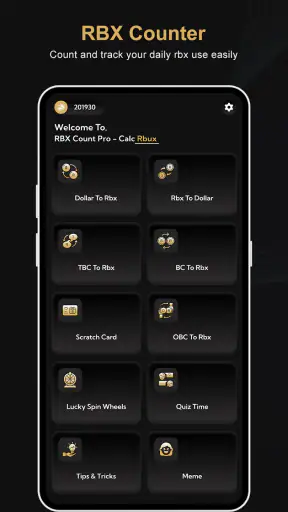
I tried RBX Count Pro - Calc Rbux as a lightweight tool for keeping track of Roblox-related currency figures, and my first impression was clear: it is aimed at people who want a simple counter and calculator rather than a full companion platform. The app is free, rated for Everyone, and belongs to the Tools category, so its appeal comes from quick, focused use rather than a large collection of extras.
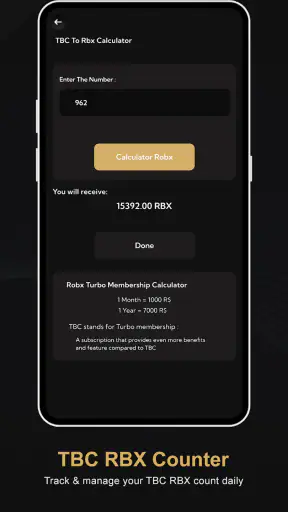
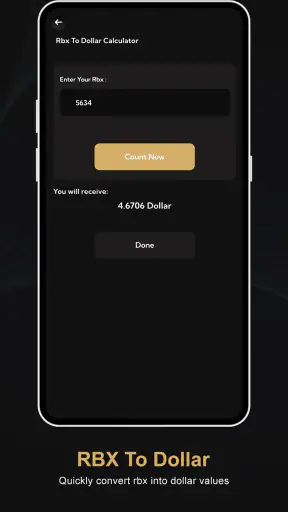
The basic idea is easy to understand. You enter or review RBX values, use the calculator to convert figures, and keep an eye on daily amounts. That makes it useful when you are comparing numbers, planning a purchase, or trying to build a more consistent habit around checking your balance. It does not try to replace the official Roblox experience. Instead, it works as a separate utility for people who prefer having calculations and counting in one place.
How I used the app from a normal starting point
My usual workflow with a tool like this is deliberately simple. I open it before making a calculation, enter the value I want to examine, check the converted result, and then close it rather than leaving it running in the background. That approach suits RBX Count Pro because the app is most useful as an on-demand helper. It is not something I would open continuously while playing.
The counter is the part that feels most practical for everyday use. If I want to record how much I have counted during the day, I can treat the app as a small logbook instead of relying on memory. This is especially handy when I am checking several amounts at different times. The important habit is to use the same starting point each time: decide whether I am recording a current balance, a target, or a daily change, and avoid mixing those purposes.
That distinction sounds minor, but it prevents a common mistake. A counter can show progress, while a calculator can show an estimate or conversion. They answer different questions. I found the app easier to use when I first wrote down what I wanted to know, such as “How much is this amount after conversion?” or “How much have I counted today?” Then I used the appropriate part instead of treating every number as interchangeable.
A realistic example would be a player checking a planned purchase after school. I might enter the amount into the calculator, compare the result with the figure I have recorded, and then update my daily count if I am tracking progress. This takes less effort than switching between a calculator, a notes app, and a separate reminder. The benefit is not complex automation; it is having the relevant number tools together.
There is also value in using it before rather than after a decision. If I am unsure whether a particular amount fits within a limit I set for myself, I can calculate it first and avoid making a rushed choice. The app does not make the decision for me, but it gives me a quick place to check the arithmetic. For younger users, that simple pause can be more useful than the counter itself.
One thing I would not do is treat the app as an official account screen. A separate counter or calculator should be considered a planning aid, not proof of an account balance. If I need to confirm an actual purchase, transaction, or account detail, I would use the official Roblox service. That separation is important because a utility can help organize numbers without having access to, or authority over, the account itself.
Settings and preparation that make the routine clearer
Because this is a focused tool, I would begin by checking the available app settings on my device and inside the app before settling into a routine. I would look for options that affect how values are displayed, how the counter behaves, or how easily I can reset an entry. I would not assume that a setting exists just because another calculator has it. The useful principle is to inspect what is actually available and keep only the choices that make repeated use easier.
My most important preparation step would be choosing one naming convention in my own notes. For example, I might label a number as “current,” “target,” or “today.” RBX Count Pro can handle the calculation, but the meaning of each number still comes from me. This small habit prevents confusion when I return later and cannot remember whether a figure was an original amount or a converted result.
I would also check whether the app opens in the same working area I use most often. If it presents the counter first, I would use that for daily tracking; if the calculator is easier to reach, I would make that my starting point. The fastest setup is the one that matches the task I perform most frequently. Repeatedly searching through screens is unnecessary friction, particularly when the whole reason to use a utility is speed.
Another useful habit is to test a familiar calculation before relying on the result. I would enter a small, easily checked value and confirm that I understand how the app presents the conversion. This is not about distrusting every result; it is about learning the app’s input and output style. Once I know whether it expects a particular format or shows a particular kind of estimate, later calculations become less error-prone.
The app’s current version is 1.0, so I would keep my expectations realistic when exploring settings. A first release can be perfectly usable while still feeling more basic than mature calculator tools. I would avoid building a complicated workflow around an option until I had used it several times. If a feature is central to my routine, I would also recheck it after updates rather than assuming the interface will always remain identical.
Device compatibility is straightforward for many users because it supports Android 7.0 and later. That makes it suitable for older Android phones as well as newer ones, although the experience can still vary with screen size and system behavior. On a smaller display, careful entry matters more. I would slow down for long numbers and verify the result rather than relying only on a quick glance.
Faster patterns for repeated counting and conversion
Experienced use here is less about secret functions and more about repeatable behavior. I would create a short sequence: open the app, decide whether I need the counter or calculator, enter one value at a time, verify the output, and record the meaning of the result. Keeping that order consistent reduces the chance of accidentally adding a converted figure to a count that was meant to contain original values.
For daily tracking, I would update the counter at the same natural moment each day, such as after checking my Roblox activity. The exact time is less important than consistency. If I check at random moments, the numbers become difficult to compare. A repeatable check gives the counter a purpose, while sporadic entries can turn it into a collection of figures with no clear story.
For conversion work, I would group similar calculations together. Instead of entering one amount, leaving the app, and returning later for another, I would prepare the values first and process them in one session. This is a useful trade-off: batching is faster, but it also increases the risk of confusing one result with another. To avoid that, I would keep the original figure beside the converted one in my notes.
A particularly useful pattern is to separate planning from recording. I might use the calculator several times while considering different amounts, but only add the final chosen figure to the counter. That keeps exploratory numbers from polluting the daily record. It is a small workflow improvement, yet it makes the counter much more meaningful over time.
I would also avoid tapping quickly when switching between fields. With number tools, speed is only helpful if the input is correct. My practical shortcut is to use short entries, check the displayed value, and then move on. This is faster than correcting a mistake after several calculations have been mixed together.
Another sensible use is a personal spending boundary. I can choose a limit outside the app, use the calculator to compare possible amounts, and then use the counter to monitor what I have decided to track. This gives the tool a clear role without pretending it offers budgeting software. The app is good at helping me work with figures; it is not a replacement for a detailed financial planner or official purchase history.
Parents and younger users may appreciate this separation. A child can learn to compare numbers and count consistently, while an adult can remain responsible for account decisions and purchases. Since the content rating is Everyone, the app is presented as suitable for a broad audience, but I would still explain that a counter is not the same as an account balance and that calculations should be checked before acting on them.
Where the simple approach reaches its limits
The biggest limitation is the narrow scope. RBX Count Pro is useful when I need a counter or calculator, but it is not the right choice if I expect account syncing, detailed spending history, alerts, or a broad dashboard. I would choose a dedicated budgeting app for categorized expenses, a notes app for long explanations, and the official Roblox interface for account-specific information.
I also would not depend on it for high-stakes decisions without checking the result elsewhere. Any conversion tool can be misunderstood if I enter the wrong value or interpret the output incorrectly. The safest workflow is to use the app for convenience and then verify an important figure against the relevant official source. That is especially true when a calculation affects a real purchase.
The counter itself requires discipline. A tool cannot know whether I forgot an entry, counted the same activity twice, or changed the meaning of the number halfway through the day. If I want reliable records, I need a fixed routine and a clear definition of what I am counting. This is a genuine weakness for users who expect automatic tracking.
There is also a difference between a useful estimate and a guaranteed result. When I use the calculator, I treat the output as a calculation based on what I entered, not as a promise about what will appear in an account. That distinction may seem obvious to experienced users, but it is worth emphasizing for anyone who sees the word “convert” and assumes the app can perform an actual exchange.
The public response is mixed rather than outstanding: it carries a 3.1 average from around 3.1 thousand ratings, with 235 written reviews. I read that as a reason to approach it according to its narrow purpose. It has attracted over 5 million installs, which shows that the concept is reaching a substantial audience, but popularity does not remove the need to check whether its simple workflow matches my expectations.
Its free price is a clear advantage for casual testing. I can try the counter and calculator without committing money, which makes it easier to decide whether the routine is genuinely useful. At the same time, free access does not automatically mean it will replace every other tool. If I need polished history, synchronization, or advanced financial organization, I would look elsewhere rather than forcing this app into a role it was not designed to fill.
The developer is KYADA JAYDIP, and the app is currently at version 1.0. For me, that combination reinforces the need to judge it by the functions it actually provides: straightforward counting and calculation. I would not install it expecting a large ecosystem or a mature suite of companion features. Its value depends on whether a small, separate utility solves a specific problem in my routine.
Who should use it and who should skip it
I would recommend it to someone who wants a free, uncomplicated way to work with RBX figures and keep a personal daily count. It is a reasonable fit for players who frequently compare amounts, parents helping a child understand a target, or anyone who prefers a dedicated tool instead of doing every calculation mentally.
I would be more cautious about recommending it to someone who wants automatic account data. If the goal is to see a verified balance, review transactions, or manage purchases, the official Roblox experience is the better destination. If the goal is broader money management, a budgeting app will offer a more appropriate structure. RBX Count Pro makes sense when the task is narrow and manual.
It is also not ideal for users who dislike entering values themselves. The app’s usefulness depends on deliberate input and consistent counting. Someone looking for passive tracking may find the routine too hands-on. In contrast, users who like controlling exactly what is recorded may see that manual approach as a benefit.
After using it, my view is that the app succeeds when I keep the workflow modest. I use the calculator for comparison, the counter for a clearly defined record, and an official source whenever account confirmation matters. That three-part habit avoids most misunderstandings and gives the app a practical place in my day.
My final recommendation is therefore conditional but positive. RBX Count Pro - Calc Rbux is best understood as a focused number utility, not an account manager. Its free access, Everyone rating, broad Android compatibility, and simple purpose make it easy to try. The 1.0 release may feel limited beside more established tools, and the mixed 3.1 average suggests it will not satisfy every user. Still, if you want a compact way to count daily figures and perform RBX calculations without unnecessary extras, I think it is worth testing—provided you keep your records consistent and verify important account details through the official service.


